Populating HL7 Messages
This guide explains how to populate HL7 messages using the WSO2 Open Healthcare. The WSO2 Open Healthcare provides a set of built-in capabilities to construct HL7 messages using a user-friendly graphical tooling. The tooling allows you to create HL7 messages by selecting the message type or feeding the message schema and populating the message fields using visual data mapping features.
The following example demonstrates how to populate an HL7v2 ADT_A01 message using Ballerina. The example defines a custom patient record and a data mapping function to convert the patient record to an ADT_A01 message.
Step 1: Create the integration
Open WSO2 Integrator.
Select Create in the Create New Integration card.
Set Integration Name to
HL7MessagePopulate.Set Project Name to
hl7-message-populate.Select Create Integration.
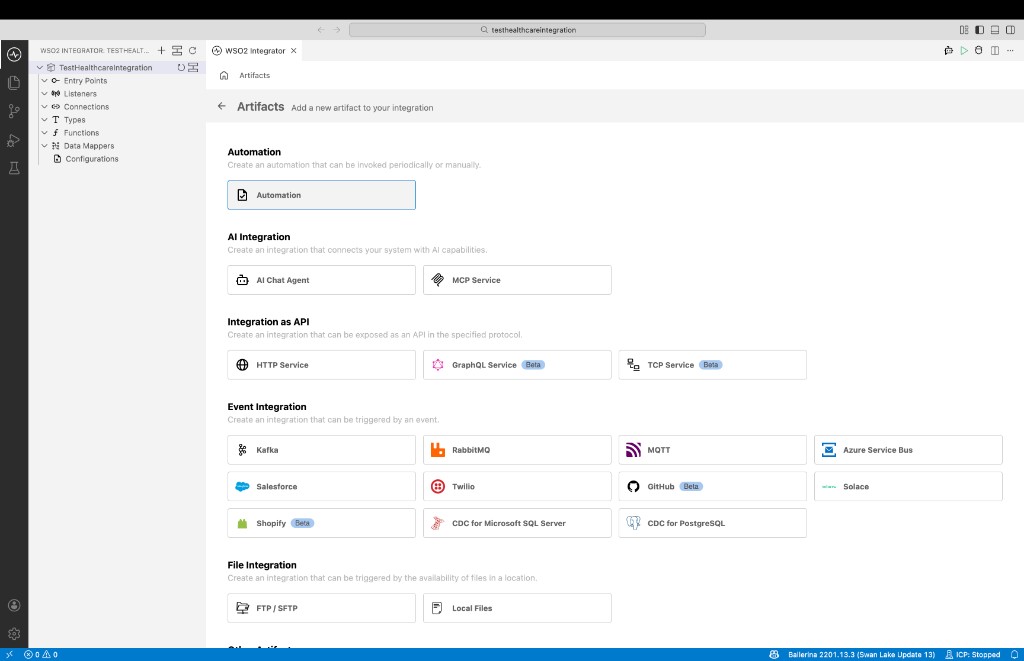
Select Add Artifact and select Automation.
Step 2: Implement the flow to populate the HL7 message
Import the required modules to the Ballerina program. In this sample we are using ADT_A01 message from HL7v2.3 version. Therefore, we need to import
ballerinax/health.hl7v23package. If you are using a different version of HL7, you can import the relevant package.import ballerinax/health.hl7v2;
import ballerinax/health.hl7v23;
import ballerina/io;Create a custom patient record type to represent the patient data. In this sample, the patient record contains the patient's first name, last name, address, and phone number.
// A custom patient record.
type Patient record {
string firstName;
string lastName;
string address;
string phoneNumber;
};Define a data mapping function to convert the patient record to an ADT_A01 message. The function takes the patient record as input and returns an ADT_A01 message. You can use the visual data mapper in ballerina to map the patient record fields to the ADT_A01 message fields. You can follow the documentation on Visual Data Mapping to learn more about visual data mapping in Ballerina.
// Data mapping function to convert a patient record to an ADT_A01 message.
function patientToAdtA01(Patient patient) returns hl7v23:ADT_A01 => {
msh: {
msh3: {hd1: "ADT1"},
msh4: {hd1: "MCM"},
msh5: {hd1: "LABADT"},
msh6: {hd1: "MCM"},
msh8: "SECURITY",
msh9: {cm_msg1: "ADT", cm_msg2: "A01"},
msh10: "MSG00001",
msh11: {pt1: "P"},
msh12: "2.3"
},
pid: {
pid5: [{xpn1: patient.lastName, xpn2: patient.firstName}],
pid11: [{xad1: patient.address}],
pid13: [{xtn1: patient.phoneNumber}]
},
pv1: {},
evn: {}
};Serialize the ADT_A01 message to a string using the
hl7:encodefunction.
The complete code sample will look as follows:
import ballerinax/health.hl7v2;
import ballerinax/health.hl7v23;
import ballerina/io;
// A custom patient record.
type Patient record {
    string firstName;
    string lastName;
    string address;
    string phoneNumber;
};
public function main() returns error? {
// Sample patient data
Patient patient = {firstName: "John", lastName: "Doe", address: "123 Main St", phoneNumber: "555-555-5555"};
hl7v23:ADT_A01 adtMsg2 = patientToAdtA01(patient);
// Serialize the ADT_A01 message to a string.
string adtMsgStr = check string:fromBytes(check hl7:encode("2.3", adtMsg2));
io:println(adtMsgStr);
}
// Data mapping function to convert a patient record to an ADT_A01 message.
function patientToAdtA01(Patient patient) returns hl7v23:ADT_A01 => {
    msh: {
        msh3: {hd1: "ADT1"},
        msh4: {hd1: "MCM"},
        msh5: {hd1: "LABADT"},
        msh6: {hd1: "MCM"},
        msh8: "SECURITY",
        msh9: {cm_msg1: "ADT", cm_msg2: "A01"},
        msh10: "MSG00001",
        msh11: {pt1: "P"},
        msh12: "2.3"
    },
    pid: {
        pid5: [{xpn1: patient.lastName, xpn2: patient.firstName}],
        pid11: [{xad1: patient.address}],
        pid13: [{xtn1: patient.phoneNumber}]
    },
    pv1: {},
    evn: {}
};
Step 3: Run and test
Select Run.
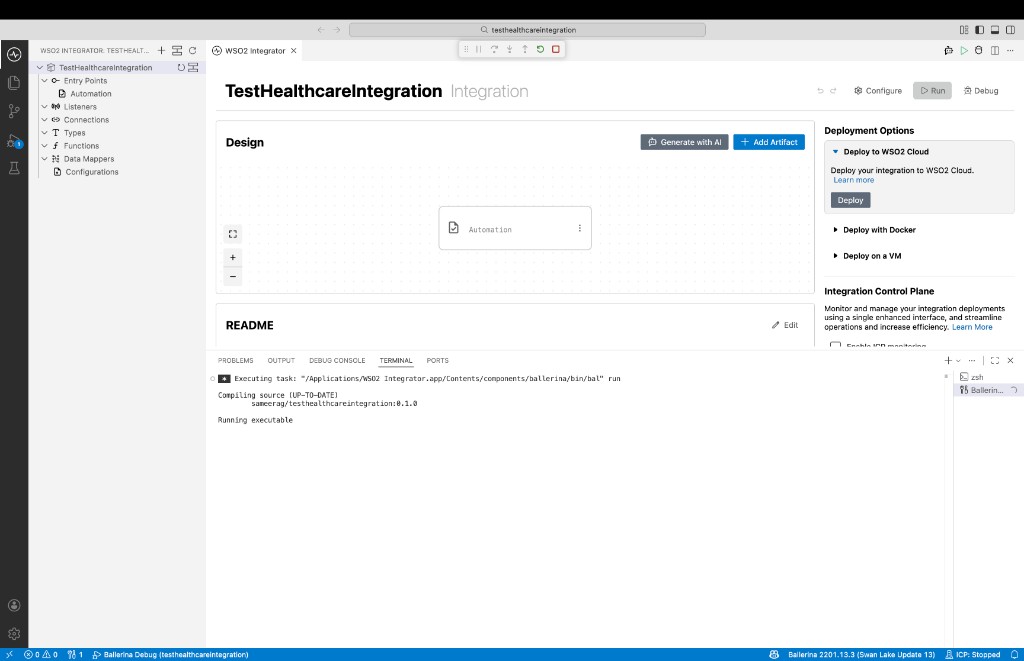
Check the terminal output to confirm the expected result.