Using FHIR Connector
Fast Healthcare Interoperability Resources (FHIR) is an interoperability standard for electronic exchange of healthcare information. The WSO2 FHIR Server connector can be used to seamlessly integrate with a External FHIR Server of your choice.
The Ballerina FHIR client will allow the users to interact with a FHIR server. The client supports all the standard interactions specified in the FHIR specification.
The following example demonstrates how to use the FHIR client to interact with a FHIR server.
Step 1: Create the integration
Open WSO2 Integrator.
Select Create in the Create New Integration card.
Set Integration Name to
FHIRServerClient.Set Project Name to
fhir-server-client.Select Create Integration.
Select Add Artifact and select Automation.
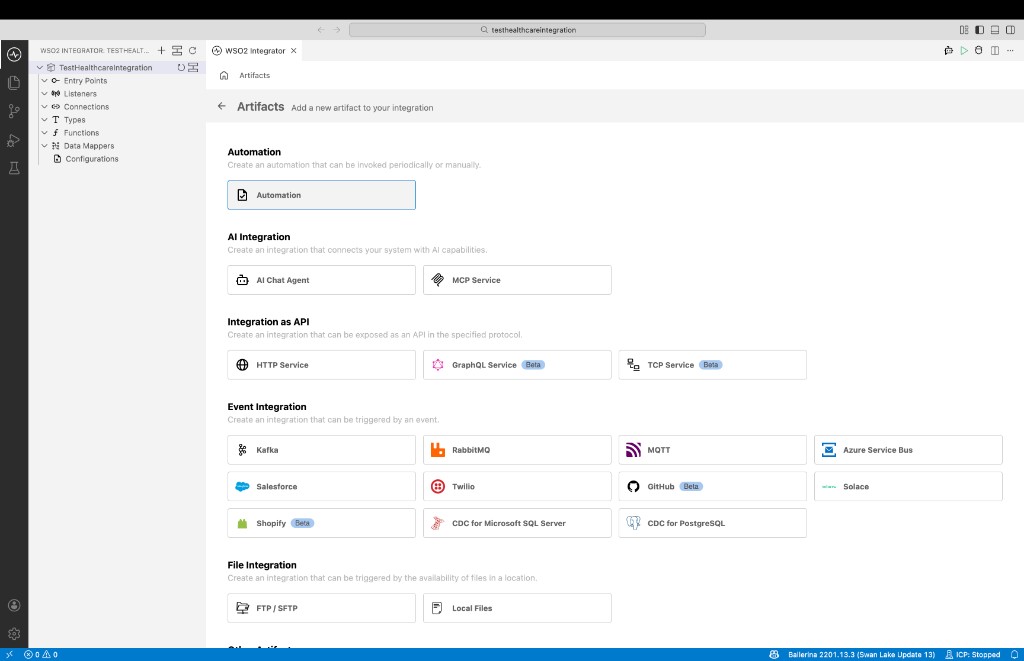
Step 2: Implement the logic to connect to the External FHIR Server
Import the required modules to the Ballerina program. In this sample, we are using the FHIR R4 module to interact with the FHIR server. Therefore, we need to import the
ballerinax/health.clients.fhirpackage.import ballerinax/health.clients.fhir;
import ballerina/io;Implement the logic to connect to the External FHIR Server. In this sample, we are connecting to a HAPI Public FHIR server using the FHIR Server connector.
import ballerinax/health.clients.fhir;
import ballerina/io;
// Define the FHIR server connection configuration. If your server requires authentication, you can configure
// it using the `authConfig` field.
fhir:FHIRConnectorConfig fhirServerConfig = {
baseURL: "https://hapi.fhir.org/baseR4",
mimeType: fhir:FHIR_JSON
};
// Create a new FHIR connector using the configuration.
fhir:FHIRConnector fhirConnector = check new (fhirServerConfig);
public function main4() returns error? {
// Search for a patient with the name "homer". You can provide additional search parameters as a map.
// There are other client operations available in the FHIR connector, such as `create`, `update`, `delete` etc.
fhir:FHIRResponse|fhir:FHIRError response = fhirConnector->search("Patient", {"name": "homer"});
if response is fhir:FHIRResponse {
io:println("response status code: ", response.httpStatusCode);
io:println("response content: ", response.'resource);
}
}
Step 3: Run and test
Select Run.
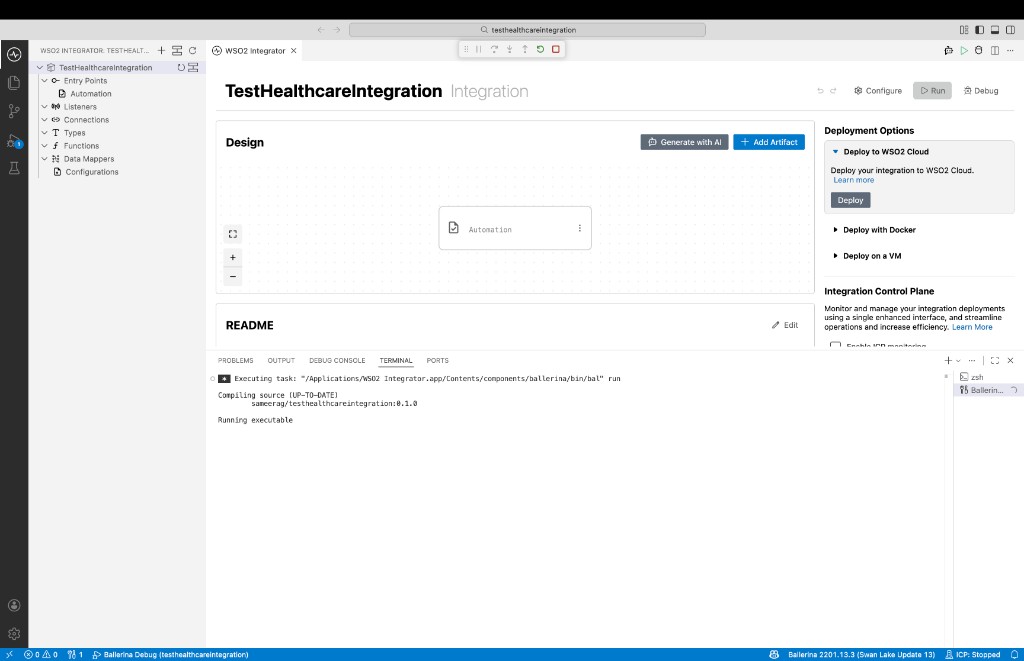
Check the terminal output to confirm the expected result.
Operations
- The default MIME type value is
application/fhir+json, and can be changed at operation level. - Function parameter
summaryis an enum consisting of a set of types specified in the FHIR specification. - Required parameters are marked with an asterisk (
*). - In the initial implementation, JSON or XML is used instead of record representation of the resource types, since the FHIR model implementation is not yet complete.
- In search-related operations, search parameters are a map of key-value pairs (for example:
{"key": "value"}).
Instance Level Interactions
getById
Retrieves a FHIR resource by specifying the resource ID and type.
| Property | Details |
|---|---|
| Parameters | type* - The name of a resource type (e.g. "Patient") |
id* - The logical Id of the resource | |
returnMimeType - The MIME type of the return response | |
summary - Subset of the resource content to be returned | |
| Returns | Requested FHIR resource in specified format | OperationOutcome |
| FHIR Operation | Read |
Example:
fhir:FHIRResponse|fhir:FHIRError response = fhirConnector->getById("Patient", "1");
getByVersion
Retrieves a version-specific FHIR resource by specifying the resource ID, type, and version identifier.
| Property | Details |
|---|---|
| Parameters | type* - The name of a resource type (e.g. "Patient") |
id* - The logical Id of the resource | |
version* - FHIR version-specific identifier | |
returnMimeType - The MIME type of the return response | |
summary - Subset of the resource content to be returned | |
| Returns | Requested version-specific FHIR resource | OperationOutcome |
| FHIR Operation | vread |
Example:
fhir:FHIRResponse|fhir:FHIRError response = fhirConnector->getByVersion("Patient", "1", "1");
update
Creates a new current version for an existing resource. If the resource doesn't exist, an initial version will be created. Use this when you want to specify your own ID instead of having the server assign it.
| Property | Details |
|---|---|
| Parameters | data* - Resource data |
returnMimeType - The MIME type of the return response | |
returnPreference - Specifies what the return response should contain (default: full resource) | |
| Returns | Updated resource | OperationOutcome |
| FHIR Operation | Update |
Example:
fhir:FHIRResponse|fhir:FHIRError response = fhirConnector->update({"resourceType": "Patient", "id": "example"});
patch
Creates a new current version for an existing resource by updating part of the resource. Currently only FHIRPath Patch is supported; additional content types will be available in future releases.
| Property | Details |
|---|---|
| Parameters | type* - The name of a resource type (e.g. "Patient") |
id* - The logical Id of the resource | |
data* - Resource patch data | |
returnMimeType - The MIME type of the return response | |
returnPreference - Specifies what the return response should contain (default: full resource) | |
| Returns | Patched resource | OperationOutcome |
| FHIR Operation | Patch |
Example:
fhir:FHIRResponse|fhir:FHIRError response = fhirConnector->patch("Patient", "123", {"resourceType": "Patient", "id": "1", "active": true});
delete
Deletes an existing resource.
| Property | Details |
|---|---|
| Parameters | type* - The name of a resource type (e.g. "Patient") |
id* - The logical Id of the resource | |
| Returns | Nothing | OperationOutcome |
| FHIR Operation | Delete |
Example:
fhir:FHIRResponse|fhir:FHIRError response = fhirConnector->delete("Patient", "123");
getInstanceHistory
Retrieves the change history for a particular resource.
| Property | Details |
|---|---|
| Parameters | type* - The name of a resource type (e.g. "Patient") |
id* - The logical Id of the resource | |
parameters - History search parameters (e.g. _count, _since, _at) | |
returnMimeType - The MIME type of the return response | |
uriParameters - Additional parameters as a name-value map | |
| Returns | Requested histories | OperationOutcome |
| FHIR Operation | History |
Example:
fhir:FHIRResponse|fhir:FHIRError response = fhirConnector->getInstanceHistory("Patient", "123");
Type Level Interactions
create
Creates a new resource of a specified type. The server assigns the resource ID.
| Property | Details |
|---|---|
| Parameters | data* - Resource data |
returnMimeType - The MIME type of the return response | |
returnPreference - Specifies what the return response should contain (default: minimal) | |
| Returns | Created resource | OperationOutcome |
| FHIR Operation | Create |
Example:
fhir:FHIRResponse|fhir:FHIRError response = fhirConnector->create(
    {
        "resourceType": "Patient",
        "name": [{"family": "Simpson", "given": ["Homer"]}]
    }
);
search
Searches all resources of a particular type using specified search parameters.
| Property | Details |
|---|---|
| Parameters | type* - The name of a resource type (e.g. "Patient") |
searchParams* - A map of search parameter name-value pairs | |
returnMimeType - The MIME type of the return response | |
| Returns | Search response (Bundle) | OperationOutcome |
| FHIR Operation | Search |
Example:
fhir:FHIRResponse|fhir:FHIRError response = fhirConnector->search("Patient", {"id": "123"});
getHistory
Retrieves the change history for a particular resource type.
| Property | Details |
|---|---|
| Parameters | type* - The name of a resource type (e.g. "Patient") |
parameters - History search parameters (e.g. _count, _since, _at) | |
returnMimeType - The MIME type of the return response | |
| Returns | Requested histories | OperationOutcome |
| FHIR Operation | History |
Example:
fhir:FHIRResponse|fhir:FHIRError response = fhirConnector->getHistory("Patient", {"_count": "10"});
System Level Interactions
getConformance
Retrieves information about the server's capabilities.
| Property | Details |
|---|---|
| Parameters | mode - Type of information to return (default: full) |
returnMimeType - The MIME type of the return response | |
uriParameters - Additional parameters as a name-value map | |
| Returns | CapabilityStatement | OperationOutcome |
| FHIR Operation | Capabilities |
Example:
fhir:FHIRResponse|fhir:FHIRError response = fhirConnector->getConformance();
getAllHistory
Retrieves the change history for all resources supported by the system.
| Property | Details |
|---|---|
| Parameters | parameters - History search parameters (e.g. _count, _since, _at) |
returnMimeType - The MIME type of the return response | |
| Returns | Requested histories | OperationOutcome |
| FHIR Operation | History |
Example:
fhir:FHIRResponse|fhir:FHIRError response = fhirConnector->getAllHistory({"_count": "10"});
searchAll
Searches across all resource types using specified search parameters. Only base search parameters can be used.
| Property | Details |
|---|---|
| Parameters | searchParams* - A map of search parameter key-value pairs |
returnMimeType - The MIME type of the return response | |
| Returns | Search results (Bundle) | OperationOutcome |
| FHIR Operation | Search |
Example:
fhir:SearchParameters searchParams = {_lastUpdated: ["gt2021-01-01T00:00:00Z"]};
fhir:FHIRResponse|fhir:FHIRError response = fhirConnector->searchAll(searchParams);
batchRequest
Submits a set of actions to perform on a server in a single HTTP request. A single request can consist of a mix of interactions (read, search, create, update, delete, etc.).
| Property | Details |
|---|---|
| Parameters | data* - Request data (Bundle with type batch) |
returnMimeType - The MIME type of the return response | |
| Returns | Batch response (Bundle) | OperationOutcome |
| FHIR Operation | Batch |
Example:
fhir:FHIRResponse|fhir:FHIRError response = fhirConnector->batchRequest({"resourceType": "Bundle", "type": "batch", "entry": [{"request": {"method": "GET", "url": "Patient?_lastUpdated=gt2021-01-01T00:00:00Z"}}]});
transaction
Submits a set of actions to perform on a server in a single HTTP request in a transactional manner (all-or-nothing). A single request can consist of a mix of interactions (read, search, create, update, delete, etc.).
| Property | Details |
|---|---|
| Parameters | data* - Request data (Bundle with type transaction) |
returnMimeType - The MIME type of the return response | |
| Returns | Transaction response (Bundle) | OperationOutcome |
| FHIR Operation | Transaction |
Both batch and transaction use the FHIR Bundle resource with types batch and transaction respectively. For DELETE/GET methods, the request entry uses this format. For POST/PATCH/PUT methods, the request entry includes a resource field alongside the request details.
Example:
fhir:FHIRResponse|fhir:FHIRError response = fhirConnector->'transaction({"resourceType": "Bundle", "type": "transaction", "entry": [{"request": {"method": "GET", "url": "Patient/1"}}]});
Bulk data export
For asynchronous FHIR Bulk Data Access ($export) against an external FHIR server, use bulkExport, bulkStatus, and waitForBulkExportCompletion on the FHIR client connector. See Bulk Data Export for configuration, export levels, and examples.