Quick start guide
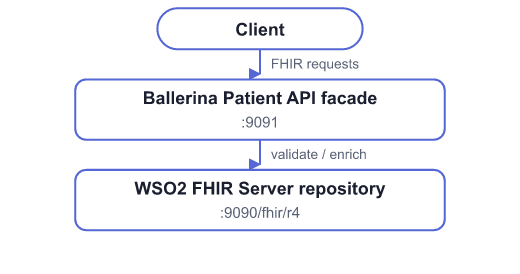
This quick start walks you through building a FHIR R4 Patient API facade for the international base Patient profile. You will:
- Start the WSO2 FHIR Server as the FHIR repository.
- Generate a Ballerina Patient API template with the Ballerina Health Tool.
- Implement search and create against the repository, with extra business logic in the facade.
- Run and test the facade locally.
Prerequisites
Docker (or Colima / Rancher Desktop) for the FHIR Server stack.
Ballerina 2201.12.10 or higher.
The Ballerina Health Tool:
bal tool pull health
Step 1: Start the FHIR repository
Clone and start wso2/fhir-server:
git clone https://github.com/wso2/fhir-server.git
cd fhir-server
docker compose up -d
Wait until the repository is ready:
curl -sv http://localhost:9090/health/ready
# Expect: HTTP/1.1 200 OK
The FHIR base URL is http://localhost:9090/fhir/r4.
Step 2: Generate the international Patient API template
Generate a Ballerina FHIR API template for the international R4 Patient profile. With no local IG path, the Health Tool downloads hl7.fhir.r4.core and uses ballerinax/health.fhir.r4.international401:
bal health fhir -m template \
  -o generated \
  --org-name healthcare_samples \
  --dependent-package ballerinax/health.fhir.r4.international401 \
  --included-profile http://hl7.org/fhir/StructureDefinition/Patient \
  --non-interactive
Open the generated project (for example generated/fhir-service/). It contains:
service.bal— Patient FHIR service stubs (GET,POST, search, and so on)patient_api_config.bal— resource API config and search parametersBallerina.toml— package metadata
For US Core or other IGs, pass the matching --dependent-package and profile URL. See Developing FHIR APIs.
Step 3: Point the facade at the repository
Create Config.toml in the generated project. Run the facade on 9091 so it does not collide with the repository on 9090:
fhirRepositoryBaseUrl = "http://localhost:9090/fhir/r4"

[ballerina.http]
defaultListenerPort = 9091
In service.bal, import the FHIR client and connect to the repository:
import ballerina/http;
import ballerina/log;
import ballerina/uuid;
import ballerinax/health.clients.fhir;
import ballerinax/health.fhir.r4;
import ballerinax/health.fhir.r4.international401;
import ballerinax/health.fhirr4;

public type Patient international401:Patient;

configurable string fhirRepositoryBaseUrl = ?;

final fhir:FHIRConnector fhirRepository = check new (
    connectorConfig = {
        baseURL: fhirRepositoryBaseUrl,
        mimeType: fhir:FHIR_JSON
    },
    enableCapabilityStatementValidation = false
);

const string FACADE_SOURCE_SYSTEM = "http://wso2.com/fhir/facade/source";
const string MRN_SYSTEM = "http://hospital.example.org/mrn";
Step 4: Implement create with facade logic
Replace the generated POST stub with logic that:
- Requires
Patient.name. - Defaults
activetotruewhen omitted. - Assigns an MRN identifier when none is provided.
- Tags the resource as created through the facade.
- Persists the enriched Patient in the FHIR repository.
isolated resource function post .(r4:FHIRContext fhirContext, Patient patient)
        returns Patient|r4:OperationOutcome|r4:FHIRError {
    Patient|r4:FHIRError enrichedPatient = applyCreateFacadeLogic(patient = patient);
    if enrichedPatient is r4:FHIRError {
        return enrichedPatient;
    }

    json|error payload = enrichedPatient.toJson();
    if payload is error {
        return r4:createFHIRError("Failed to serialize Patient", r4:ERROR, r4:PROCESSING,
                cause = payload, httpStatusCode = http:STATUS_INTERNAL_SERVER_ERROR);
    }

    fhir:FHIRResponse|fhir:FHIRError response = fhirRepository->create(
        data = payload,
        returnPreference = fhir:REPRESENTATION
    );
    if response is fhir:FHIRError {
        return r4:createFHIRError("Unable to create Patient", r4:ERROR, r4:PROCESSING,
                cause = response, httpStatusCode = http:STATUS_BAD_GATEWAY);
    }
    return check mapJsonToPatient(resourcePayload = response.'resource);
}
Facade enrichment helper (simplified):
isolated function applyCreateFacadeLogic(Patient patient) returns Patient|r4:FHIRError {
    // Reconstruct nested records from the inbound payload before mutating.
    // The FHIR listener may leave JSON inherent types on nested arrays.
    r4:HumanName[] reconstructedNames = [];
    r4:HumanName[]? inboundNames = patient.name;
    if inboundNames is r4:HumanName[] {
        foreach r4:HumanName inboundName in inboundNames {
            reconstructedNames.push({
                family: inboundName.family,
                given: inboundName.given
            });
        }
    }
    if reconstructedNames.length() == 0 {
        return r4:createFHIRError(
                "Patient.name is required by the facade before creating a resource.",
                r4:ERROR,
                r4:PROCESSING,
                httpStatusCode = http:STATUS_BAD_REQUEST);
    }

    string mrnValue = "MRN-" + uuid:createType4AsString().substring(startIndex = 0, endIndex = 8);
    return {
        resourceType: "Patient",
        active: patient.active ?: true,
        name: reconstructedNames,
        gender: patient.gender,
        birthDate: patient.birthDate,
        identifier: [{
            use: "official",
            system: MRN_SYSTEM,
            value: mrnValue
        }],
        meta: {
            tag: [{
                system: FACADE_SOURCE_SYSTEM,
                code: "patient-api-facade",
                display: "Created via Ballerina Patient API facade"
            }]
        }
    };
}
When enriching inbound FHIR resources, build a new Patient record (or re-map nested arrays) instead of mutating the listener payload in place. Nested arrays from JSON conversion can retain JSON inherent types and fail at runtime on assignment.
Step 5: Implement search with facade logic
Replace the generated search stub so the facade:
- Rejects empty searches (requires at least one clinical parameter).
- Defaults
_countto10when the client omits it. - Forwards the query to the FHIR repository and returns the
searchsetBundle.
isolated resource function get .(r4:FHIRContext fhirContext)
        returns r4:Bundle|r4:OperationOutcome|r4:FHIRError {
    map<string[]> searchParams = buildRepositorySearchParams(fhirContext = fhirContext);

    if !hasClinicalSearchParam(searchParams = searchParams) {
        return r4:createFHIRError(
                "At least one search parameter is required (for example: family, given, gender, or birthdate).",
                r4:ERROR,
                r4:PROCESSING,
                httpStatusCode = http:STATUS_BAD_REQUEST);
    }

    if !searchParams.hasKey("_count") {
        searchParams["_count"] = ["10"];
    }

    fhir:FHIRResponse|fhir:FHIRError response = fhirRepository->search(
        "Patient",
        searchParameters = searchParams
    );
    if response is fhir:FHIRError {
        return r4:createFHIRError("Unable to search Patient resources", r4:ERROR, r4:PROCESSING,
                cause = response, httpStatusCode = http:STATUS_BAD_GATEWAY);
    }
    return check mapJsonToBundle(resourcePayload = response.'resource);
}

isolated function buildRepositorySearchParams(r4:FHIRContext fhirContext) returns map<string[]> {
    map<string[]> searchParams = {};
    map<r4:RequestSearchParameter[] & readonly> requestSearchParameters =
            fhirContext.getRequestSearchParameters();

    foreach string paramName in requestSearchParameters.keys() {
        r4:RequestSearchParameter[] & readonly paramValues = requestSearchParameters[paramName] ?: [];
        string[] stringValues = [];
        foreach r4:RequestSearchParameter requestParam in paramValues {
            stringValues.push(requestParam.value);
        }
        if stringValues.length() > 0 {
            searchParams[paramName] = stringValues;
        }
    }
    return searchParams;
}
Also implement read by forwarding to the repository:
isolated resource function get [string id](r4:FHIRContext fhirContext)
        returns Patient|r4:OperationOutcome|r4:FHIRError {
    fhir:FHIRResponse|fhir:FHIRError response = fhirRepository->getById("Patient", id);
    if response is fhir:FHIRError {
        return r4:createFHIRError(string `Unable to read Patient/${id}`, r4:ERROR, r4:PROCESSING,
                cause = response, httpStatusCode = http:STATUS_BAD_GATEWAY);
    }
    return check mapJsonToPatient(resourcePayload = response.'resource);
}
Helper mappers:
isolated function mapJsonToPatient(json|xml resourcePayload) returns Patient|r4:FHIRError {
    if resourcePayload is xml {
        return r4:createFHIRError("XML responses are not supported by this facade sample",
                r4:ERROR, r4:PROCESSING, httpStatusCode = http:STATUS_UNSUPPORTED_MEDIA_TYPE);
    }
    Patient|error mappedPatient = resourcePayload.cloneWithType();
    if mappedPatient is error {
        return r4:createFHIRError("Failed to map repository response to Patient",
                r4:ERROR, r4:PROCESSING, cause = mappedPatient,
                httpStatusCode = http:STATUS_INTERNAL_SERVER_ERROR);
    }
    return mappedPatient;
}

isolated function mapJsonToBundle(json|xml resourcePayload) returns r4:Bundle|r4:FHIRError {
    if resourcePayload is xml {
        return r4:createFHIRError("XML responses are not supported by this facade sample",
                r4:ERROR, r4:PROCESSING, httpStatusCode = http:STATUS_UNSUPPORTED_MEDIA_TYPE);
    }
    r4:Bundle|error mappedBundle = resourcePayload.cloneWithType();
    if mappedBundle is error {
        return r4:createFHIRError("Failed to map repository response to Bundle",
                r4:ERROR, r4:PROCESSING, cause = mappedBundle,
                httpStatusCode = http:STATUS_INTERNAL_SERVER_ERROR);
    }
    return mappedBundle;
}
Step 6: Run the facade
From the generated project directory:
bal run
The Patient API listens at http://localhost:9091/fhir/r4/Patient.
Step 7: Test search and create
Create a Patient (facade enrichment)
curl -s -X POST http://localhost:9091/fhir/r4/Patient \
  -H "Content-Type: application/fhir+json" \
  -d '{
    "resourceType": "Patient",
    "name": [{"family": "Smith", "given": ["Alice"]}],
    "gender": "female",
    "birthDate": "1990-05-15"
  }'
Expected behavior:
- HTTP
201 activeset totrue- An MRN under
identifier(http://hospital.example.org/mrn) - A
meta.tagwith codepatient-api-facade
Reject create without a name
curl -s -X POST http://localhost:9091/fhir/r4/Patient \
  -H "Content-Type: application/fhir+json" \
  -d '{"resourceType":"Patient","gender":"female"}'
Expected: HTTP 400 OperationOutcome requiring Patient.name.
Search by family
curl -s "http://localhost:9091/fhir/r4/Patient?family=Smith"
Expected: a Bundle of type searchset containing the created Patient.
Reject empty search
curl -s "http://localhost:9091/fhir/r4/Patient"
Expected: HTTP 400 OperationOutcome requiring at least one search parameter.
Confirm persistence in the repository
# Replace {id} with the Patient id returned by create
curl -s "http://localhost:9090/fhir/r4/Patient/{id}"
The same Patient (including facade-assigned MRN and tag) is stored in the WSO2 FHIR Server.
What you built
| Layer | Responsibility |
|---|---|
| Ballerina Patient API facade | FHIR API surface, validation, enrichment, search defaults |
ballerinax/health.clients.fhir | Client calls to the repository (create, search, getById) |
| WSO2 FHIR Server | FHIR R4 persistence, indexing, and search |
Next steps
- Developing FHIR APIs — Generate templates for more resources and IGs
- FHIR Search — Deeper search parameter handling and pagination
- Using FHIR Connector — Full connector operation reference
- Deploy FHIR APIs — Expose the facade through WSO2 API Manager